winutil-MAX: Windows Optimizer & Tweaks Suite
A fast, customized edition of Chris Titus WinUtil featuring custom themes, smart bulk file renaming, context menu ownership tools, and automated tweak presets.
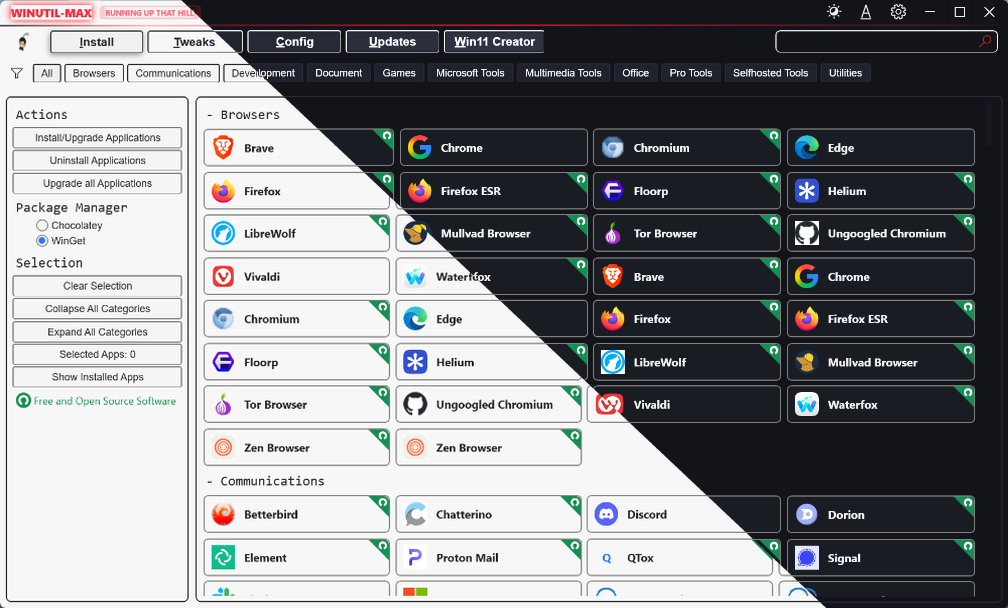
Quick Launch
Launch winutil-MAX directly from an elevated PowerShell or Windows Terminal session:
irm rinkurapria.dev/win | iexAttribution: winutil-MAX is built upon the open-source engine created by Chris Titus Tech and community contributors.
Key Features
winutil-MAX packages essential Windows debloating, package management, and custom sysadmin utilities into a unified suite:
- 📼 Dual Aesthetic: Dark synthwave (Max Mayfield) and clean light mode themes.
- 🏷️ Smart Bulk Renamer: Regex search/replace, sequential numbering, and case formatting with live preview (Config tab).
- 🔑 Take Full Ownership: One-click Explorer context menu ownership integration with root drive protection (Config tab).
- 📦 Curated Software & Tweaks: Winget/Chocolatey package installs, telemetry blocking, and Windows feature toggles.
Automation Presets
Execute unattended optimizations for imaging pipelines or batch setups without launching the GUI:
& ([ScriptBlock]::Create((irm rinkurapria.dev/win))) -Preset <Standard|Minimal|Advanced|Enterprise>- Standard: Balanced baseline for personal workstations and general use.
- Minimal: Light tweaks keeping all optional Windows services intact.
- Advanced: Aggressive debloat, latency optimizations, and telemetry removal for power rigs.
- Enterprise: Applies safe optimizations while preserving corporate policies and update stability.
Source & Credits
winutil-MAX is open source on GitHub: github.com/R-Rinku/winutil-max. Upstream engine: Chris Titus Tech (ChrisTitusTech/winutil).
Related Articles
Subscribe to the Newsletter
Get real-world IT troubleshooting guides, Azure VDI case studies, and sysadmin automation tips in your inbox.